Welcome to Ruritania
Create your account to enter our virtual world (OpenSim).
How to log in with Firestorm (with screenshots)
Ruritania's address (the one you must type):
http://13.140.212.217:8002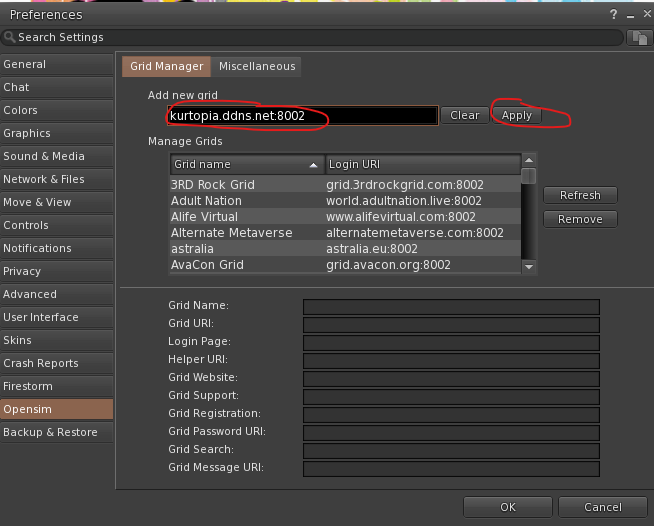
The Opensim tab in Preferences: in "Add new grid" type Ruritania's address from the green box (the picture is an example with another grid) and click Apply.
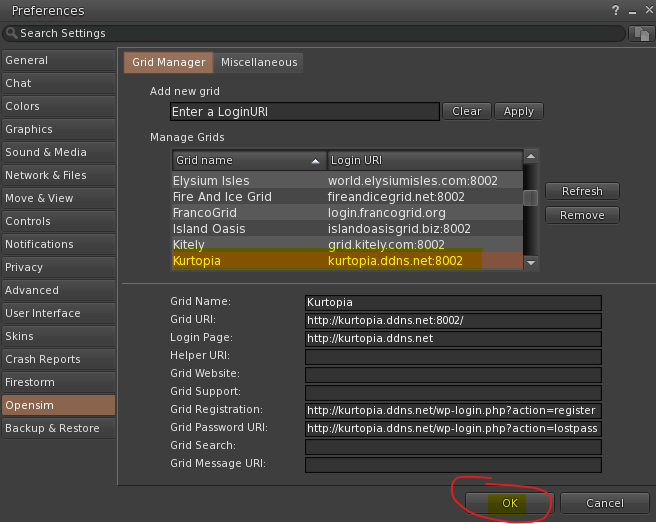
The grid is added to the list with its details filled in (you'll see "Ruritania"): click OK.

On the login screen: choose "Ruritania", enter your name and password and click Log In.
Screenshots from Kurtopia's connection guide (kurtopia.ddns.net).
Note: the address with :8002 is only for the viewer (Firestorm). If you open it in a browser you'll get a 404 error: that's normal, the world is not a web page.